Airbnb
How Airbnb search decides who shows first
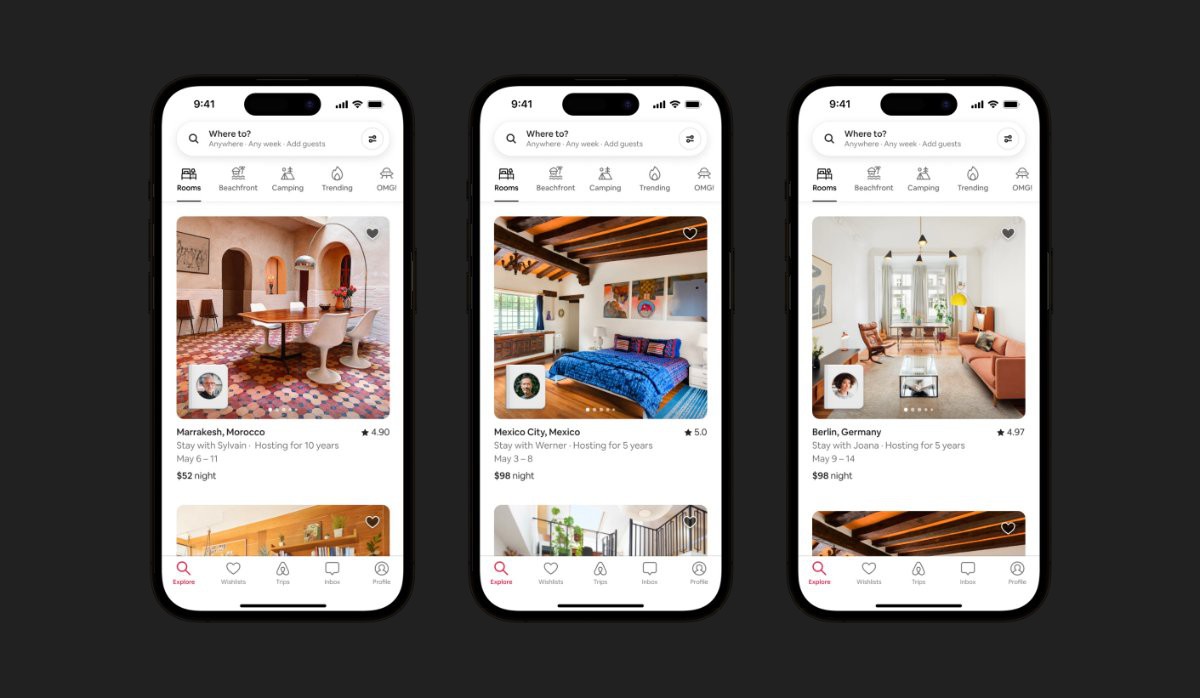
Two flats in the same street, at a similar price, can get very different numbers of bookings on Airbnb. The difference can start before a guest opens either listing: one shows on the first screen of results, the other several screens down.
This guide explains what Airbnb itself says about how its search results are ordered, and which parts of that you control. It uses only what Airbnb publishes in its Help Centre and Resource Center, at the time of writing (November 2026). Revamp is not affiliated with Airbnb, and nobody outside Airbnb knows the full formula, so be careful with anyone who promises you a top spot.
The short answer
Airbnb says four things have the largest effect on where a listing appears: quality, popularity, price and, for homes, location. You can't move your building, but you can work on the other three. Keep more dates open, price well against similar places for the exact dates guests search, keep your photos and details complete, reply quickly, avoid cancelling, and think about Instant Book. Then check how you're doing every month, because Airbnb says its ranking will change over time.
What Airbnb says it looks at
Airbnb's Help Centre article on how search results work says the search matches listings to each guest's search and weighs many signals. It names four with the largest effect.
Quality
- Photos and videos, listing details and amenities
- Guest ratings and reviews
- Messaging between host and guest, customer service and cancellation terms
Popularity
- How often guests save a listing to a wishlist
- How often they book it
- How often they message the host
Price
- The total price for the guest's dates
- Compared with similar listings nearby, with guest capacity and amenities in mind
Location
- For homes, places guests like to stay, such as near popular landmarks
Airbnb also says it mixes in variety, so results show different hosts, property types and prices, and that it personalises results using a guest's past bookings and current reservations. Two guests searching the same dates may see a different order, and the map can show different listings from the list. There is no single position that is "yours".
Price: compared for the exact dates
Airbnb says listings priced well against comparable options tend to rank higher, and the comparison is on the total price for the dates searched. So compare the whole stay, not just the nightly rate.
Say you charge ֏30,000 a night with a ֏10,000 cleaning fee. A guest staying one night pays ֏40,000 before Airbnb's own fees and taxes. A guest staying three nights pays ֏100,000, or about ֏33,300 a night. The same listing can look expensive for one night and fair for three.
Airbnb's own tips say adjusting prices or offering discounts can help newer listings and slower seasons. Use that advice, but never below your floor. Pricing your first season shows how to work your floor out, and chapter 4 of this course covers Airbnb's Smart Pricing.
Availability and trip length
A listing can only appear for dates it can actually be booked on. Airbnb's Help Centre says opening more dates and, for homes, accepting a wider range of stay lengths lets you match more guests' plans. Its Resource Center adds that changing your trip length settings and extending how far ahead guests can book can help your listing appear in more search results.
In practice, check three things:
- Blocked dates you forgot about. Old blocks for repairs or family visits that no longer apply.
- Minimum stays that are too long. A three-night minimum hides you from every two-night search. Minimum stays, discounts and longer stays covers how to set them by season.
- A short booking window. If guests can only book a few months ahead, you're missing from searches for later dates.
Photos, details and the features guests filter for
Quality starts with what guests see. Airbnb suggests high-quality photos and video, a thorough description, and listing the features guests look for. Its examples include a crib, a hot tub, a step-free entrance and your pet policy.
Guests can narrow results with filters. An amenity you have but haven't ticked can't help you. Our suggestion:
- Go through every amenity in your listing settings and tick all that are true
- Never tick one you don't have, because guests rate accuracy after the stay
- Make sure your photos show the features you list
How to get great listing photos and Writing a listing that gets booked cover the basics.
Replies, Instant Book and cancellations
This is the part most hosts underestimate. Airbnb's Help Centre says that, for homes, its search considers the Superhost criteria, including cancellations, responsiveness and ratings. It also says Instant Book listings may rank higher, because bookings are confirmed automatically, and that for listings without Instant Book, how fast you respond and how often you decline requests matter.
What helps
- Answering every new message and request within 24 hours
- Keeping your calendar accurate, so you never need to cancel
- Turning on Instant Book if your calendar and rules allow it
What hurts
- Requests left to expire
- Cancelling confirmed bookings
- Declining many requests
Chapter 2 explains the Superhost criteria in detail, and chapter 4 covers Instant Book settings.
Popularity: earning saves, messages and bookings
Wishlist saves, messages and bookings show Airbnb that guests like what they see. You can't ask for them directly, but you can make them more likely. A strong first photo and a clear title earn the click. A fair price and open dates earn the save. Good reviews earn the booking. Airbnb says listings with better ratings and reviews tend to rank higher, so every stay feeds the next search.
New listings usually appear in search within 24 hours, Airbnb says, though it can take longer.
Search mistakes to avoid
- Believing anyone who promises a fixed position
- Comparing nightly rates when guests see the total
- Cutting your price below your floor to climb
- Leaving old blocked dates and long minimum stays in place
- Ticking amenities you don't have
- Letting requests expire or cancelling confirmed guests
- Changing many settings at once, so you can't tell what helped
Your checklist
Your calendar
- Old blocks removed
- Minimum stays set by season
- Booking window long enough for the next season
Your listing
- Every true amenity ticked, nothing false
- Photos show the features you list
- Total price checked for one, three and seven nights
Your habits
- Every message and request answered within 24 hours
- No cancellations
- Instant Book considered
Questions hosts ask
Why does my listing show on page one for me and page four for my friend?
Airbnb personalises results using each guest's past bookings and current reservations, and mixes in variety. Different guests see different orders.
Will cutting my price always move me up?
Not always. Airbnb compares your total price with similar listings for the dates, among many other signals. A lower price that falls below your floor loses money on every booking, wherever you appear.
My new listing doesn't appear at all. What's wrong?
Airbnb says new listings usually appear within 24 hours, sometimes longer. Check that your calendar has open dates and your minimum stay isn't too long.
Does Revamp know Airbnb's ranking formula?
No. Revamp is not affiliated with Airbnb. This guide only explains what Airbnb publishes in its Help Centre and Resource Center at the time of writing.