Your listing & AI search
Using AI for your listing and replies without breaking the rules
AI tools can save a host hours: a first draft of a description, a polite reply at midnight, a tidier photo. The booking sites now build these tools in themselves. But every site also holds you responsible for what your listing says and shows, however it was made. A pool an AI invented, a crack it painted out or a review it wrote can cost you the listing.
This guide sets out what Airbnb, Booking.com, Google, Tripadvisor, GetYourGuide and Viator say about AI-made text, photos, replies and reviews, and how to protect guests' data when you use a chatbot. It uses their own pages at the time of writing (November 2026). Revamp is not affiliated with any of them, and this isn't legal advice.
The short answer
Use AI to draft, never to decide. Check every line it writes before it goes live, because the sites treat it as yours. Never use AI to change how a place looks, to invent features, or to write reviews. Let it suggest replies, then read and edit before sending. Don't paste guests' names, phone numbers or passport details into a chatbot, and switch off training on your account if you use one.
Text: AI drafts, you're responsible
What the sites say
- Airbnb says your photos and description "should accurately represent the space provided". It now writes its own AI summaries of homes in search results too, but its rules still hold hosts responsible for accuracy
- Booking.com writes your property description itself from the details you give, in a set format, and asks you to check it's accurate. Its terms say your information must be "true, accurate and not misleading", and its content guidelines name "AI-generated content that is misleading or deceptive"
- GetYourGuide's supplier terms (October 2026) say it may use AI to edit your content, and that any AI text you accept or leave live becomes your content, with GetYourGuide "not responsible for any inaccuracies"
- Viator's AI Product Builder lets you edit everything it writes before you submit
- Google allows AI-written content on websites, but says it's "critical to manually factcheck and review all AI-generated content" before publishing
What to do
- Give the tool your real facts first: rooms, beds, distances, what's included
- Read every line it writes against your place
- Delete anything you can't prove: "stunning views", "five minutes from everything", an amenity you don't have
- Check the version the site shows guests, including descriptions the site writes for you
On Revamp, the ✨ Aha AI button in the listing form drafts a title and descriptions from the facts you've entered. It's a draft: edit it before you save. Chapter 2 covers what good facts look like.
Photos: real, not improved
This is where AI does the most damage.
- Airbnb says it will ask hosts to remove content "if AI or other digital technology has been used to edit flaws", hide damage or add amenities the home doesn't have, and repeated or serious cases can mean suspension
- Booking.com asks you to avoid over-processed photos, filters, strong contrast, over-saturation and heavy HDR
- Google says Business Profile photos should have no significant alterations and "should represent reality", and Maps asks people to avoid "heavily edited or otherwise manipulated photos"
- Viator asks for photos that "honestly reflect" the experience
Fine: straightening a crooked shot, correcting the brightness, cropping out a neighbour's car.
Not fine: removing a stain, a crack or a power line; adding a view, sunshine, furniture or a pool; an AI-generated picture of a room.
A guest who arrives to a different place writes a review about it, and the sites side with the guest.
Replies to guests: AI suggests, you send
Both big sites now offer AI help with messages, and both keep you in charge:
- Airbnb's suggested replies appear only to you, and you can edit them or write your own
- Booking.com's "Help me reply" suggests an answer in the Extranet chat. Booking.com asks you to review it carefully, edit it and send it only if you agree. It also offers automatic replies to common questions you set up yourself
Neither site says whether automatic or scheduled messages count toward your response rate. Answer real questions yourself, within 24 hours.
On Revamp, Aha AI can suggest a reply in your inbox from your listing's details. You can also let Aha answer guests when you haven't replied within a set time. It's off until you turn it on, it hands questions about money, changes and anything it doesn't know to you, and guests see that the answer came from Aha. You can switch it on in Dashboard → Settings.
Reviews: never AI-written
Every site bans reviews that aren't based on a real stay:
- Tripadvisor says plainly that review content generated by AI isn't allowed, and that people who submit it may be banned. Anyone connected to a property may not review it
- Google bans content "not based on a real experience" and reviews paid for in any form
- Booking.com and Airbnb ban fake reviews and reviews of your own property
- GetYourGuide bans review manipulation and contacting customers privately about a review
Replies to reviews
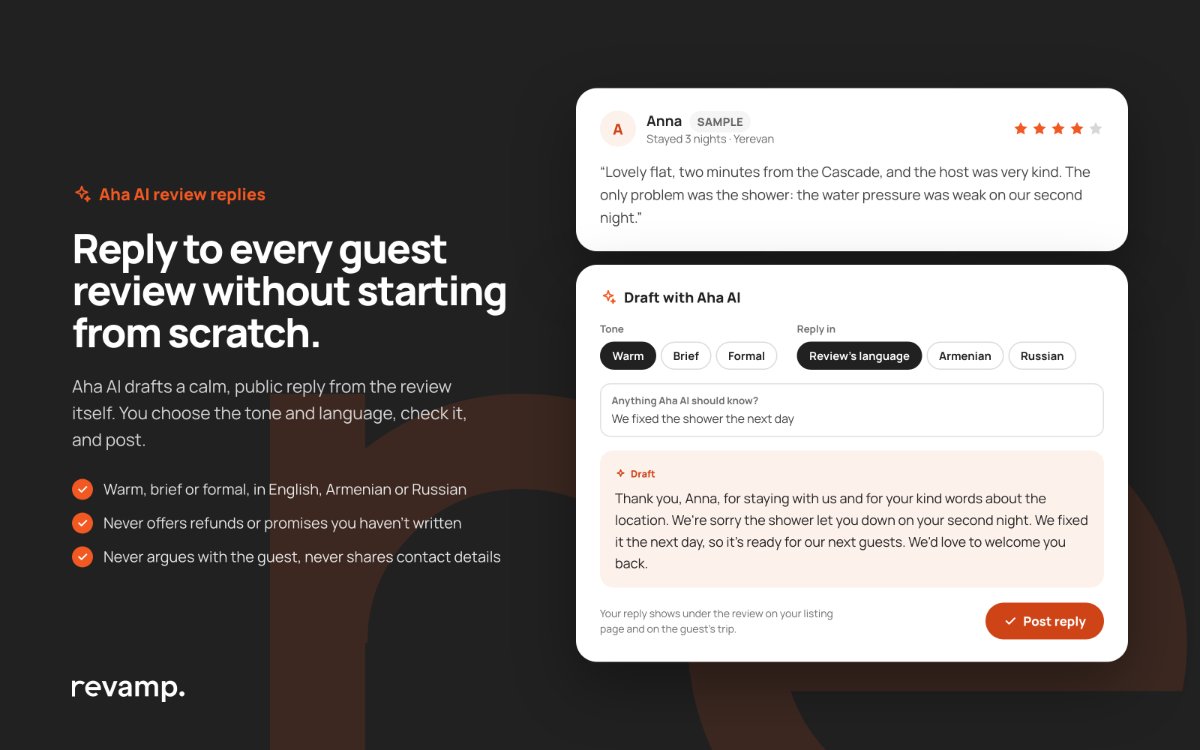
No site we checked bans AI help with a review reply. Booking.com asks for replies that are "original" and "true and accurate", and Tripadvisor bans material copied from elsewhere. So if AI helps with the words, make each reply specific to that guest and that stay, and check every claim. Replying to every review gives you a structure.
Guests' data and chatbots
A chatbot is a third party. Treat it like one.
Don't paste in
- Guests' full names, phone numbers, emails or passport details
- Door codes, Wi-Fi passwords or your own logins
- Screenshots of a booking with personal details on it
Say "a guest arriving Friday" instead of a name. Armenia has a Law on Protection of Personal Data (2015), and the booking sites expect guest details to stay on their platforms.
Switch off training
- ChatGPT: on Free, Plus and Pro accounts, OpenAI uses your chats to train its models by default. Turn it off in Settings → Data controls → "Improve the model for everyone". Temporary Chats aren't used for training
- Claude: Anthropic asks each user to choose. If you allow it, chats can be kept for up to five years; if not, 30 days. Change it in Privacy Settings → Model improvement
Even with training off, OpenAI says not to share sensitive information you wouldn't want used or reviewed.
Mistakes to avoid
- Publishing an AI description without checking every line
- Not checking the description a site writes for you
- Editing flaws out of photos, or adding what isn't there
- Sending AI replies without reading them
- Any review you wrote, paid for or had AI write
- Guests' names, numbers or documents in a chatbot
- Leaving training switched on in a personal chatbot account
Your checklist
Text
- Facts given first, every line checked
- Site-written descriptions checked
Photos
- Only light fixes: straighten, brighten, crop
- Nothing removed, nothing added
Messages
- AI suggestions read and edited before sending
- Real questions answered by you within 24 hours
Reviews
- None written, paid for or generated
- Replies specific to each guest
Privacy
- No guest details in chatbots
- Training switched off
Questions hosts ask
Am I allowed to use ChatGPT to write my description?
Yes, as long as everything it writes is true and you've checked it. The sites hold you responsible for the result, not the tool.
Can I brighten my photos?
Yes. Light fixes are fine. Removing flaws or adding things that aren't there isn't.
Can AI reply to my guests for me?
It can suggest. On Airbnb and Booking.com you review and send. On Revamp, automatic Aha AI answers are off until you switch them on, and guests see they came from Aha.
Can AI help me reply to a bad review?
No site bans it, but write a specific, honest reply and check every word. A generic reply reads worse than a short honest one.
Is it safe to paste a guest's message into ChatGPT?
Remove their name and contact details first, and switch off training.