Airbnb
Airbnb settings that earn bookings
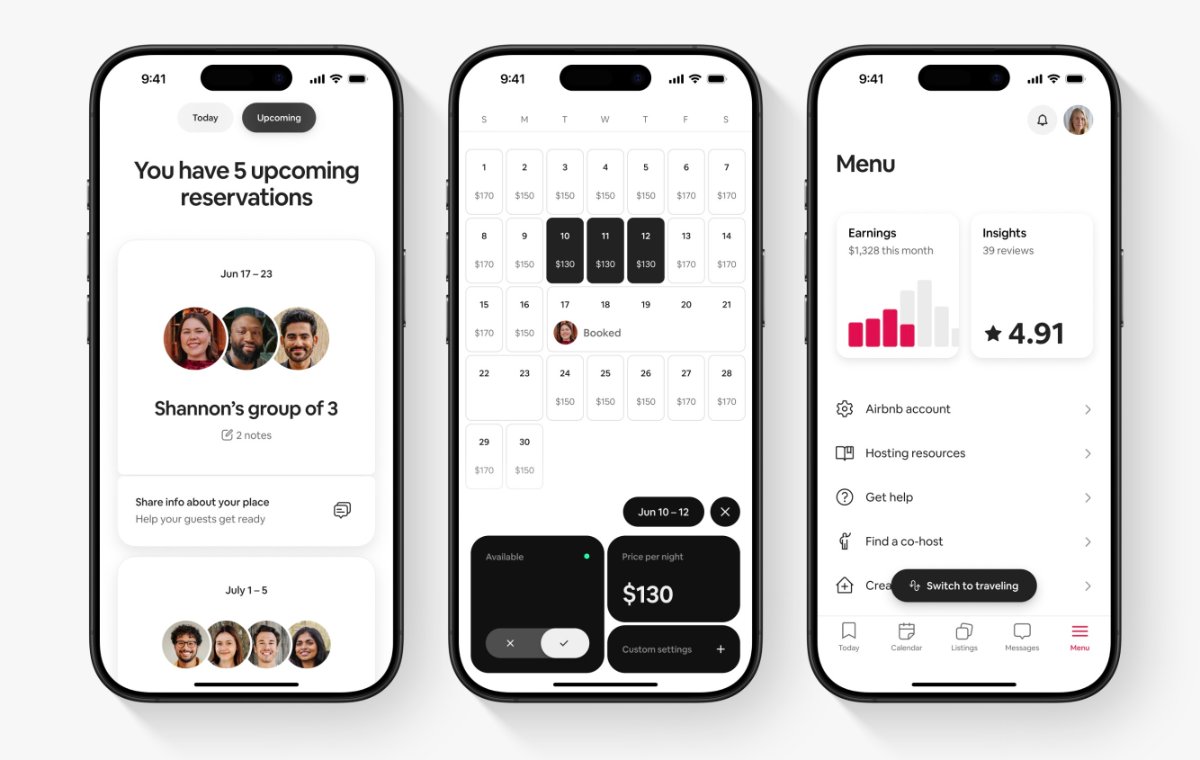
Two hosts can have the same flat, the same photos and the same price, and still fill their calendars very differently. Part of the difference can sit in a handful of Airbnb settings that are easy to set once and forget.
This guide goes through the settings that decide which bookings you can get: Instant Book, trip length, advance notice, preparation time, the booking window and Smart Pricing. It uses what Airbnb's Help Centre and Resource Center say at the time of writing (November 2026), and it keeps one rule throughout: no setting should ever take your price below your floor.
The short answer
Turn on Instant Book if your calendar is reliable and your house rules are clear. Use advance notice and preparation time only as much as your turnovers really need, because every blocked night is a night you can't sell. Open your calendar far enough ahead, but price those far dates first. If you use Smart Pricing, set its minimum high enough that your discounts can't drag the price below your floor. Keep every calendar synced, because an accidental double booking turns into a cancellation.
Instant Book: when it helps
With Instant Book, guests can book available dates straight away, without waiting for you to approve. Airbnb's Help Centre says Instant Book listings may rank higher in search, because bookings are confirmed automatically, and guests can filter search to show only Instant Book places.
What guests must do first
- Complete Airbnb's identity verification
- Agree to your house rules
- Meet your requirements, if you set them
Airbnb lets you limit Instant Book to guests with a positive track record: at least one completed stay and no negative reviews. Guests who don't qualify can still send a request, and Airbnb says you must accept, decline or message them within 24 hours.
Instant Book works well when
- Your calendar is accurate on every site
- Your house rules say clearly what you expect
- You can welcome a guest who books tonight, or your advance notice stops that
If a guest makes clear they'll break a house rule, Airbnb says you can cancel without penalty. You can never cancel for a reason that breaks Airbnb's nondiscrimination policy.
Trip length beyond the basics
Minimum stays, discounts and longer stays covers setting minimum nights by season and check-in day. Airbnb offers two more tools.
- Maximum nights. Airbnb says raising the maximum attracts guests who want longer stays, which means fewer turnovers. You can also allow requests beyond your maximum and review each one.
- Custom trip length. A shorter minimum for specific dates fills a gap without changing the whole calendar.
Airbnb's Resource Center says changing your trip length settings can help your listing appear in more search results. It also says your minimum and maximum should follow local rules, so check any that apply to you.
Advance notice and same-day bookings
Advance notice is the time you need between a booking and the guest's arrival. Airbnb's options are same day, 1, 2, 3 or 7 days. If you allow same-day bookings, you choose a cut-off time between 6 am and midnight. You can also let guests send a request when they book with less notice than you've set.
Our suggestion: set the cut-off to the latest time you can still have the place ready and send check-in details. With self check-in and a cleaner on call, that can be late in the evening. If someone has to meet every guest, make it earlier. A check-in that runs itself helps you move it later.
Preparation time: count the nights it costs
Preparation time blocks nights before and after every reservation. Airbnb's options are none, 1 night or 2 nights before and after each stay.
It helps when a turnover can't happen the same day, for example after long stays, a deep clean or repairs. But every blocked night is a night you can't sell. Say you host mostly two-night stays. With one night of preparation time, a back-to-back week can fit at most one booking every three nights, because each stay brings an empty night with it.
Our suggestion: if your cleaner can turn the place round between check-out and check-in, leave preparation time at none, and block nights by hand only when a turnover needs more time.
How far ahead guests can book
The availability window sets how far ahead guests can book: 3, 6, 9, 12 or 24 months, according to Airbnb's Resource Center. It says a longer window helps your listing appear in more search results.
A longer window also means guests can book dates you haven't priced yet. Before you open next summer:
- Set your seasonal prices for the months you're opening.
- Check Busy dates for big events and raise those dates first.
- Set minimum stays for peak weekends.
If you host on Revamp, the Market researcher in Dashboard → AI Agents puts your stay's price beside similar Revamp stays in your city, with busy dates and the demand outlook, which helps when you price months ahead.
Smart Pricing, carefully
Airbnb's Smart Pricing changes your nightly price automatically. Airbnb says it uses hundreds of factors about your listing and your area. You set a minimum and a maximum, you can set a custom price for any night, and price changes don't affect bookings already made.
Read three details before you turn it on.
- Discounts can go below your minimum. Airbnb says the price guests pay may fall below your Smart Pricing minimum when discounts apply. Weekly, monthly and trip length discounts override it.
- Weekend pricing needs it off. If you use weekend prices, Smart Pricing must be turned off.
- Airbnb may pause it. It can turn Smart Pricing off for a while to prevent extreme price changes, for example during emergencies.
Set the minimum above your floor
Say your floor is ֏25,000 a night and you offer a 10% weekly discount. A Smart Pricing minimum of ֏25,000 can reach ֏22,500 for a week-long guest, below your floor. To protect the floor, the minimum must be about ֏27,800 (֏25,000 ÷ 0.9). With a bigger discount, the minimum must be higher still. The break-even calculator helps you find your floor.
The same goes for Airbnb's other pricing tips. Airbnb says lower prices or discounts can help newer listings and quiet seasons. That can be true, and still lose you money if it goes below your floor.
Calendar sync: the setting behind all the others
Instant Book and a long booking window only work if your calendar is right on every site. Airbnb's Resource Center suggests syncing your Airbnb calendar with your other calendars to avoid bookings you'd have to cancel. A double booking can make you responsible for a cancellation under Airbnb's host cancellation policy. Selling on several booking sites without double bookings sets up the sync and a daily routine.
Settings mistakes to avoid
- Instant Book on with calendars that aren't synced
- Preparation time on by habit, when turnovers fit the same day
- Opening 12 or 24 months ahead at this year's prices
- A Smart Pricing minimum equal to your floor, with discounts below it
- Changing several settings in one week, so you can't tell what worked
- Leaving requests unanswered for more than 24 hours
Your checklist
Booking settings
- Instant Book decided, with guest requirements set
- Advance notice and same-day cut-off match your check-in
- Preparation time only where turnovers need it
Calendar
- Booking window set, far dates priced
- Busy dates raised early
- Every calendar synced both ways
Pricing
- Floor worked out
- Smart Pricing minimum above floor ÷ (1 − your biggest discount)
- Settings reviewed once a month, one change at a time
Questions hosts ask
Will Instant Book bring me guests I don't want?
Guests booking instantly must complete identity verification and agree to your house rules, and you can limit Instant Book to guests with a positive track record. Clear house rules matter most.
Is Smart Pricing safe?
It can save time, but Airbnb says discounts can take the price guests pay below your minimum. Set the minimum high enough that your deepest discount still leaves you above your floor.
Should I open my calendar 24 months ahead?
Only if you've priced those months. A longer window can help you appear in more searches, but a summer booked at winter prices costs you money.
Do these settings copy to my other booking sites?
No. Calendar sync shares taken dates only. Set prices, minimum stays and rules on each site yourself.